AI Generation Tools Module
Incoming Video
The AI Generation Tools Module adds powerful creative options directly to your StoryTiles.
It allows you to automatically generate AI backgrounds using StabilityXL or Midjourney (with more models coming soon!).
This feature uses ViZual™’s credit system, so you’ll need available credits to generate content.
Additionally, the module lets you create voiceovers via Eleven Labs — all seamlessly integrated inside ViZual.
No extra accounts or logins are required; your ViZual account is all you need.
How to Enable
-
Activate the Module
Open the Module Panel and enable the AI Generation Tools Module.
(See Modules Overview for general instructions.) -
Choose Your AI Feature
Once activated, you can access:- AI Image Generation
- AI Voice Generation
(Music generation coming post-alpha.)
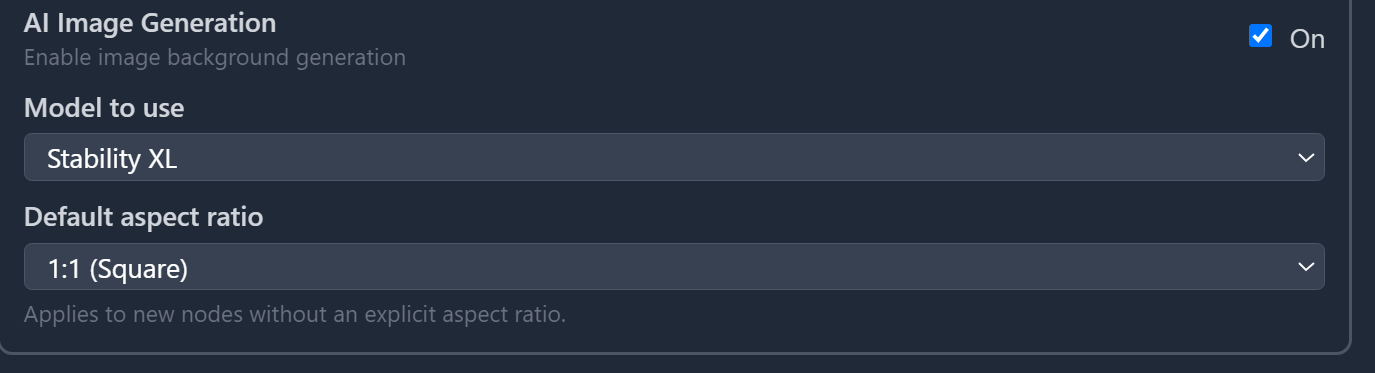
Enabling the module alone isn’t enough — make sure to also enable AI Image or Voice Generation individually inside the module settings.
-
Configure Generation Settings
For AI Image Generation, you can select your preferred model (StabilityXL or Midjourney)
and set the default aspect ratio for generated images (1:1 or 16:9).
The aspect ratio can also be adjusted independently for each StoryTile.For AI Voice Generation, you will be able to select the default voice to use for generation.
Using AI Generation in StoryTiles
Once one of the AI Generation features is enabled, new options will appear in the StoryTile Details Panel.
Under Visual / Background, you’ll find a new dropdown menu with several AI generation controls:
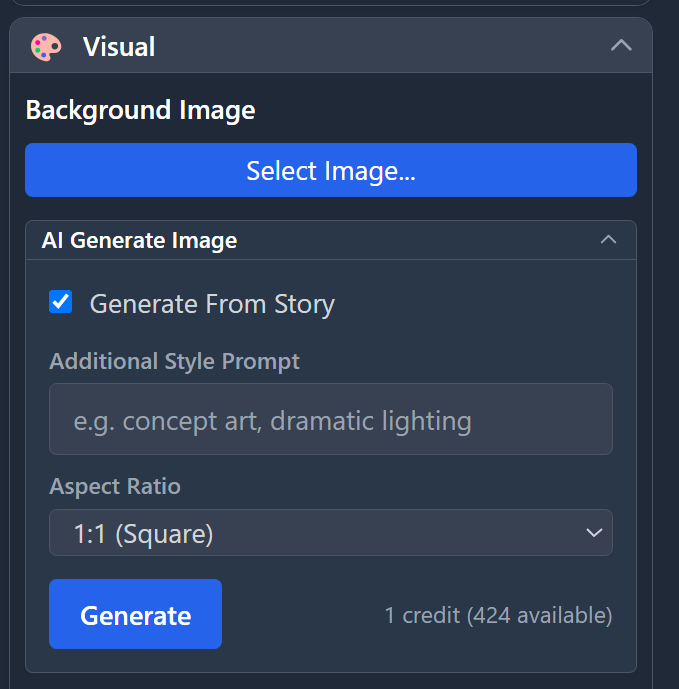
Options Overview
-
Generate From Story
When checked, ViZual will automatically generate an image based on the Story Text inside your StoryTile. -
Additional Style Prompt
Use this field to define a specific style or mood for the generated image.
If Generate From Story is turned off, this field becomes the entire prompt sent to the AI model. -
Aspect Ratio
Uses the default module setting, but can be overridden individually for each StoryTile.
Once your options are set, press the Generate button.
If you have enough credits (1 for StabilityXL, 2 for Midjourney), the request will be added to your generation queue in the top toolbar.

Things to Keep in Mind
- Generations added to the queue can still be canceled for free as long as they haven’t started.
- Once generation begins, credits are consumed and cancellation will not refund them.
- The generated image will automatically be applied as the background of the StoryTile it was triggered from.
- If a background image already exists, it will be replaced.
- Generated images are automatically saved inside your Project’s Asset Folder under the
Generatedsubfolder. - These rules also apply to Voice Over Generation.
- Eleven Labs voiceovers cost 3–5 credits, depending on length.
ViZual™ and Singular Echo™ are trademarks of Singular Echo Inc.