
StoryTile Audio
The Audio section of your StoryTile determines how everything will sound when the user reaches that point in your story.
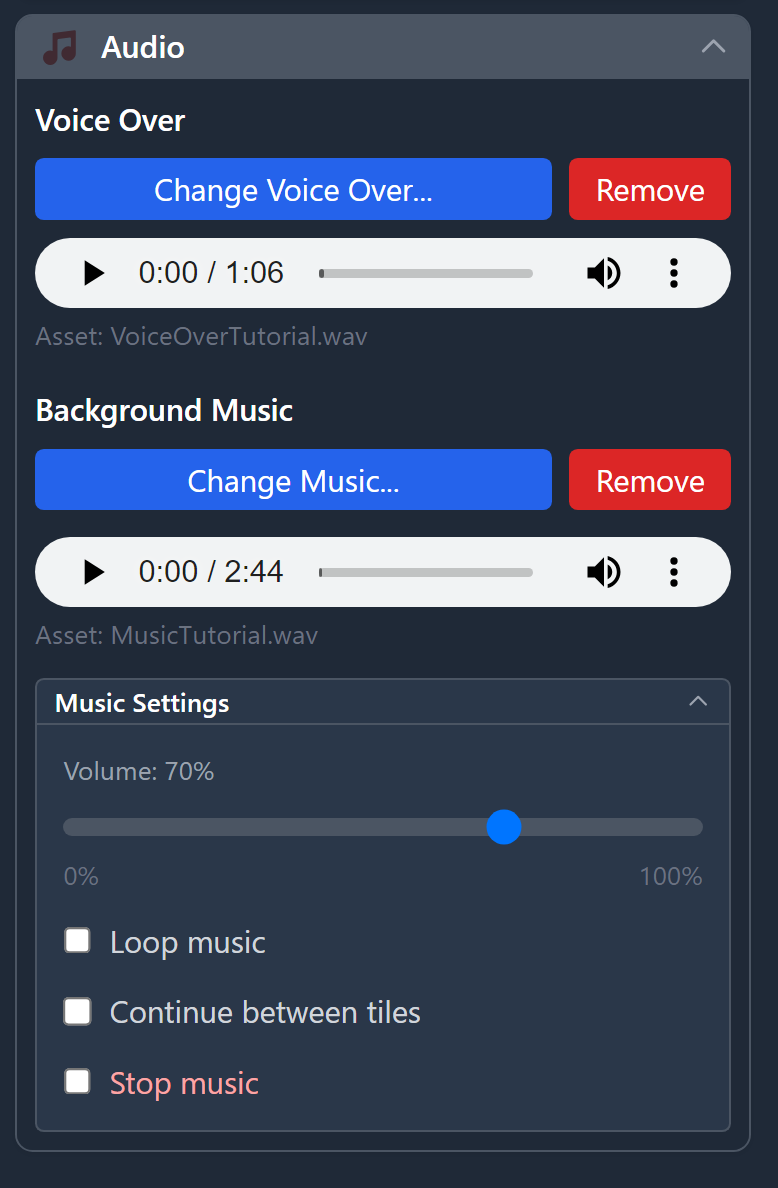
Voice Over
Voice Over automatically starts when a StoryTile is reached and plays alongside it.
If Typewriter Mode is enabled, the voice-over duration will be used to sync the typewriter effect with the audio timing.
If the user clicks anywhere in the screen both Typewriter Mode and Voice Over will be skipped.
Background Music
Background Music can be configured in several ways.
Once a file is added, you’ll see a volume control and three play options:
- Loop Music — Loops the track indefinitely until it’s stopped, changed, or replaced by another tile.
- Continue Between Tiles — Keeps the music playing as the user moves between StoryTiles.
The music will only stop if:- Looping is turned off and the track reaches its end.
- The user reaches a StoryTile with a new music track, which replaces the previous one.
- The user reaches a StoryTile with Stop Music enabled.
- Stop Music — Explicitly stops any previously loaded music from another tile.
No file needs to be selected to activate this option.
© 2025 Singular Echo Inc.
ViZual™ and Singular Echo™ are trademarks of Singular Echo Inc.
ViZual™ and Singular Echo™ are trademarks of Singular Echo Inc.